Shopping ads
Shopping ads show a product photo, title, price, store name and more, giving users a clear view of the product before they click. They are managed in Google Ads through Shopping campaigns or Performance Max campaigns. [1]
See an example
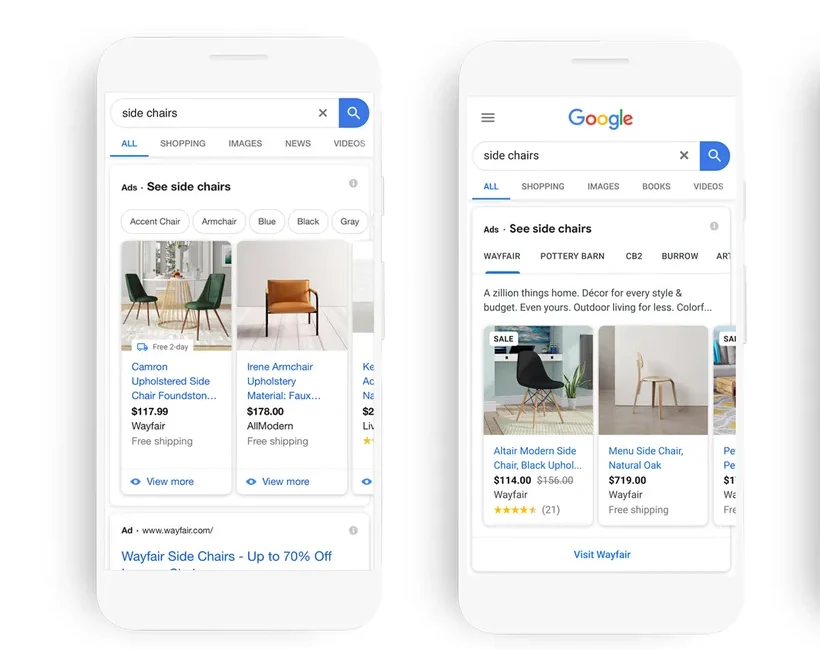
Furniture products in Google ShoppingOfficial example
Google’s product-ad preview shows the item image, title, price and shop together so shoppers can compare offers before clicking.
- Platform
- Google Ads
- Product
- Standard Shopping
- Category
- Ad formats
What you can give it
- Shopping ads use Merchant Center product data, not keywords, to decide how and where ads show; submitted product details are matched to a user's search to show the most relevant products. [1]
- Google may use landing page, image, feed and other signals, including content created by Google AI, to enrich the ads; you can opt out via your account manager or contact form, with requests typically processed in 3-5 business days. [1]
- Performance Max is a goal-based campaign type that looks at inputs such as budget and product feed and optimises performance based on them. [1]
- Ads may also serve on Google Search Partner websites, but only if the campaign is set to include search partners. [1]
Use it when
- Use it when you are a retailer wanting to promote online and local inventory and drive traffic to your website or local store. [1]
- Local Inventory Ads turn on automatically once a local products inventory feed is attached to the campaign, so attach that feed when you want local store inventory surfaced. [1]
Don’t rely on it when
- Do not rely on it when you need keyword-targeted text ads: Shopping ads match on product data rather than keywords, so keyword-level targeting control is not how the format works. [1]
Set it up
- Link your Google Ads account to Merchant Center. [1]
- Manage your Shopping ads in Google Ads using a Shopping or Performance Max campaign. [1]
- In CSS program countries, participate through one or several Comparison Shopping Services of your choice. [1]
- For Performance Max Vehicle ads, ensure the Merchant Center account is opted into the Vehicle ads program and a supported objective (Leads or Sales) is selected; for Shopping campaign Vehicle ads, select a Vehicle Feed and ensure approved vehicle offers exist in Merchant Center. [1]
What it can move
- A useful indicator is the quality of leads reaching your site: since Shopping ads give users a clear view of the product (photo, title, price, store name) before they click, Google attributes the format with producing more qualified leads. A practical metric to watch is click-to-purchase conversion rate on Shopping traffic, because the causal path runs: richer pre-click product information -> better-matched, better-informed clicks -> a higher share of clicks that convert. The trade-off is that this is an attributed reporting outcome, not an incremental uplift measurement, and it assumes your product data is accurate and current. (Because Shopping ads show price and product details before the click, the search match may pre-qualify clicks; this is a documented qualitative claim, not a measured uplift figure.) [1]
On other platforms
| Platform | Closest feature | Match | How it differs |
|---|---|---|---|
| Shopping ads | Partial | Pinterest shopping ads are built from product groups created within Pinterest's tools, whereas Google's Shopping ads are generated from a Merchant Center product feed linked to a Google Ads account. [2] | |
| Meta | Collection ads | Related | Collection ads are a mobile visual discovery format (cover creative plus product imagery in the feed), not search-matched product listings driven by Merchant Center product data. [3] |