Collection ads
Collection ads pair a cover image or video with product images and open a full-screen Instant Experience when tapped. The Instant Experience is mandatory, so build it before the ad. In Facebook Feed, the ad shows a cover image or video followed by three product images. The cover image or video uses the first media asset from your Instant Experience. [1]
See an example
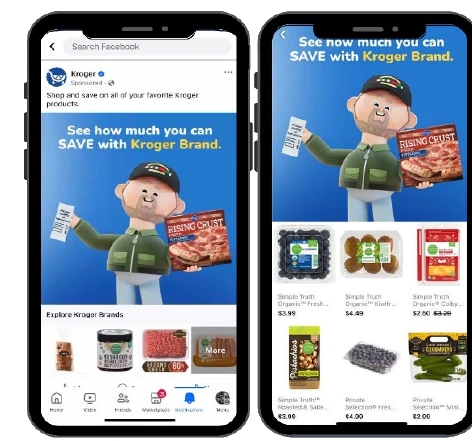
Kroger’s Collection adPublished campaign
The same product range appears in two states. The Feed ad shows the cover and a few products. A tap opens the full-screen product grid.
- Platform
- Meta
- Product
- Paid Social
- Category
- Ad formats
What you can give it
- Tapping the cover image or video on mobile opens a full-screen Instant Experience where people can discover, browse and buy products. [2]
- Tapping one of the smaller product images opens a product page that you provide, which pushes people towards purchase. [2]
- You can build the Instant Experience from the Storefront, Lookbook or Customer Acquisition templates, or make a custom one. [1]
- You set it at ad level. The objective is set at campaign level, and audience, placement and budget are shared at ad set level. [3]
Use it when
- Use it when you sell a range of products or services to mobile shoppers and want people to browse a visual, full-screen experience before reaching a product page. [1]
- The Format option in Ad setup may no longer list collection for you. You can still select it in Ad creative under Format display options, so do not assume it has been withdrawn. [2]
Don’t rely on it when
- Do not rely on it when you cannot build or maintain an Instant Experience, or have no product pages to link to. The Instant Experience and a landing page URL are both required. [1]
Set it up
- Open Meta Ads Manager and click + Create. [2]
- Select an objective: Awareness, Traffic, Engagement, Leads or Sales. Then click Continue. [2]
- At ad set level, in the Conversion section, select a conversion location or performance goal. Some objectives need extra settings. [2]
- At ad level, in Ad setup, select Single image or video or Carousel under Format. [2]
- In the Destination section, search for an existing Instant Experience, or click + Create new and choose a template. [2]
- Complete your Instant Experience and click Done. [2]
- Complete the Ad creative section. Keep primary text to 125 characters, the headline to 40, and supply a landing page URL. [1]
- Check the Ad preview across placements, finish the remaining ad settings and click Publish. [2]
What it can move
- Click-through rate and product page visits: if the cover and product images match what shoppers want, more people may tap through. The trade-off is that a weak cover asset or a slow Instant Experience can waste those clicks. [2]
- Cost per purchase or lead: if the in-experience browsing shortens the path to a product page, conversion rate may rise and cost per result may fall. This depends on the product pages and the objective. The cost is extra build and maintenance effort, and nothing guarantees an uplift. [2]
On other platforms
| Platform | Closest feature | Match | How it differs |
|---|---|---|---|
| Max width collections ads | Partial | Pinterest uses a full-width hero image or video with secondary pins beneath it. The hero and each secondary pin go to their own destination URLs. Meta's format instead opens a full-screen Instant Experience from the cover. [4] | |
| Google Ads | Shopping ads | Related | Google generates shopping ads from Merchant Center product data. They show a product photo, title, price and store name, and run in Shopping or Performance Max campaigns. Meta's collection ads use creative you design and a required Instant Experience. [5] |