Instant Form
Instant Form is a native in-app lead capture form for TikTok Lead Generation ads that lets customers share contact information, answer your questions, and learn about your business. Customers can engage with the lead ad in two ways: by clicking the ad CTA to open an Instant Form, or by answering a question directly through the Form Card on the in-feed video. [1]
See an example
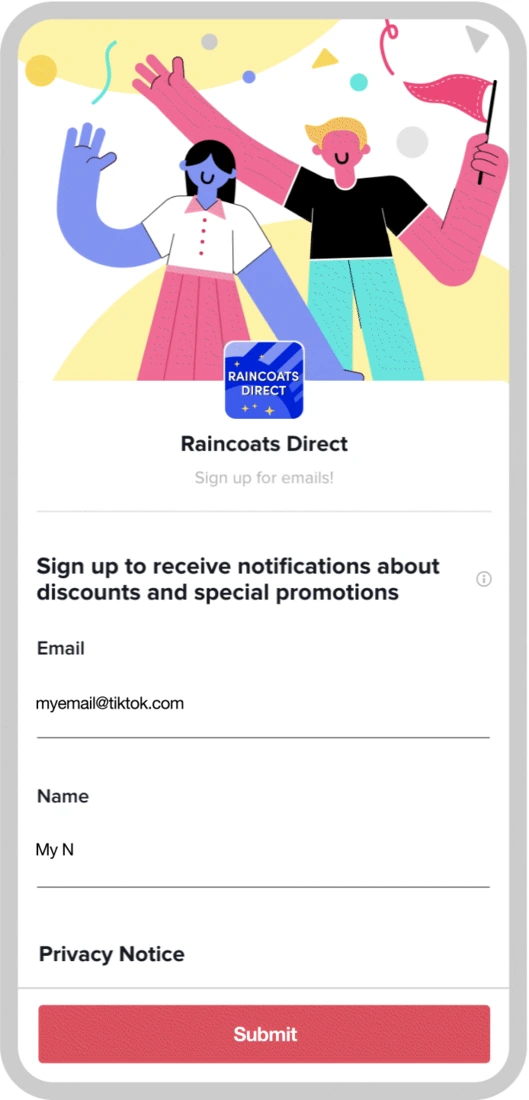
Raincoats Direct sign-up formOfficial example
TikTok’s example shows what a shopper sees when the ad opens a native form, including a banner, fields, a privacy link and the submit button.
- Platform
- TikTok
- Product
- Lead Generation
- Category
- Ad formats
What you can give it
- The form opens in-app when a user clicks the ad's call-to-action, so the lead capture happens without leaving TikTok. [1]
- The form is built in TikTok Ads Manager, either via Tools > Instant Page or during campaign creation. [1]
- The form is composed of components such as a banner, introduction, welcome page, questions, privacy section, and optional custom content blocks (product details, testimonials, FAQ, images, and more), with availability differing between form and card layouts. [1]
- The Questions section lets you create custom questions about your business or products and gather personal information (name, email, phone number) for future contact. [1]
- The Privacy section requires your company name and a link to your privacy policy; you can optionally add custom disclaimers, and required consents must be given before a user can submit the form. [1]
- Because the form collects contact details and answers to custom questions, the form completion rate and the quality of submitted leads are the natural metrics to watch, with the trade-off that required consent steps and longer question sets may reduce completions while improving lead qualification. [1]
Use it when
- Use it when you want to capture leads natively in the TikTok app, letting users share contact information and answer your questions without leaving the platform. [1]
- Use it when you want to build trust and context before the ask, by choosing the rich content form template or adding custom content blocks such as testimonials, product details, and FAQs. [1]
- Use it when you want to qualify leads, by choosing the lead qualification form template with pre-filled custom questions based on user responses. [1]
Don’t rely on it when
- Do not rely on it when you cannot meet the compliance requirements, since a privacy policy URL is mandatory and your lead ad questions must be reviewed against the Lead Ads Terms and TikTok Advertising Policies. [1]
Set it up
- Before you start, confirm you have a privacy policy URL for your organization (an existing one can be used) and review your planned lead ad questions against the Lead Ads Terms and TikTok Advertising Policies. [1]
- Log in to TikTok Ads Manager. [1]
- Open the Instant Form Editor either from the Tools tab (choose Instant Page, click Create, then select the Instant Form tab) or during campaign creation (create a Lead Generation campaign, select Instant Form as the Optimization Location at the ad group level, then click + Create in the Destination section at the ad level). [1]
- Select a form template — simple sign-up, rich content, lead qualification, vertical templates, AI-generated, blank form, or card layout — and click Confirm. [1]
- Use the drop-down menus at the top of the form creation page to set the color scheme and language of your form. [1]
- On the Content tab, customize the form components (banner, introduction, welcome page, questions, privacy, custom components), noting that the Questions and Privacy sections are required for all forms. [1]
- Once the Content is set up, click the Final Page tab to add a Thank You page. [1]
What it can move
- Track form completion rate: the mechanism is an in-app form opened from the ad CTA or Form Card, so the share of users who open the form and submit it is the direct performance measure; the trade-off is that required consent steps and more questions may lower completion while raising lead quality. [1]
- Track lead quality via your custom question answers: the lead qualification template and custom questions are designed for more effective lead qualification, so the conditional causal path is that richer question data improves downstream qualification of submitted leads. [1]
On other platforms
| Platform | Closest feature | Match | How it differs |
|---|---|---|---|
| Lead ads | Same idea | Pinterest Lead ads let people fill in a form within the ad without leaving Pinterest, delivering their information to the advertiser; TikTok Instant Form is the equivalent native in-app lead capture for TikTok Lead Generation ads, opened via the ad CTA or a Form Card on the in-feed video. [2] |