Lead ads
Lead ads are a Pinterest ad format that delivers an in-ad form, so people can submit their information without leaving Pinterest. Lead ads are not available to everyone on Pinterest; interested advertisers must contact their account manager to gain access. [1]
See an example
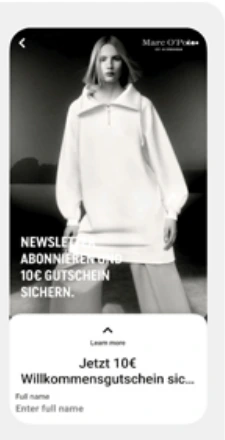
Marc O’Polo’s newsletter sign-upPublished campaign
Pinterest’s investor presentation shows the campaign creative above a native form. The sign-up stays inside Pinterest.
- Platform
- Product
- Paid Media
- Category
- Ad formats
What you can give it
- The lead form is made of components: a call to action button, a privacy policy link, optional additional disclosure language, questions people answer with their information, and a completion message. [1]
- Questions are mandatory prompts such as 'Email'; you can select from a range of options or write your own. [1]
- After submission, responses can be downloaded for up to 30 days via Pinterest Ads Manager or the Pinterest API, or through integrations with Zapier, Salesforce or Salesforce Sales Cloud. [1]
- Lead ad data is deleted 30 days after a lead is submitted and cannot be retrieved, so timely export is essential. [1]
- Because submissions are captured in-platform rather than on a destination site, in-form completion depends on the form's own questions and messaging, which means shorter, purposeful forms are a practical way to protect lead volume — a trade-off against collecting richer answers. [1]
- A useful KPI to watch is cost per lead: the mechanism delivers raw lead responses, not verified downstream sales, so treat leads as an attributed signal, not proof of incremental revenue. [1]
Use it when
Don’t rely on it when
- Do not rely on it when your team cannot commit to regular exports or a CRM integration, because lead data is permanently deleted 30 days after submission. [1]
Set it up
- Access is gated: lead ads are not available to everyone, so first contact your Pinterest account manager to be enabled. [1]
- Log in to your Pinterest business account on desktop. [1]
- Under Manage campaigns, click Create campaign, then Manual campaign and Get started. [1]
- Choose the Conversions campaign objective, then set a campaign name, status, budget optimisation and schedule, and click Continue. [1]
- Enter ad group details, select a targeting strategy and enter targeting details, and set budget and schedule. [1]
- Under Optimisation & delivery, select a conversion data source, and choose the Lead event as the conversion event. [1]
- Select your bidding strategy. [1]
- Below Ads, click Create ad, select an image or video, fill in the Pin details, and click Publish. [1]
- After the campaign is set up, choose the Leads ad format, enter an ad name and a destination URL for after form completion, and pick a call to action. [1]
- Create the lead form: name it, add questions, enter your privacy policy link URL and any additional disclosure language, add policy links, and write a completion message. [1]
- Accept the terms, click Finish, then click Publish. [1]
- Lead ad creation must currently be done on desktop; mobile visitors are directed to the web instructions. [1]
What it can move
- In Ads Manager reporting you can add a lead column and a cost-per-lead column to your reporting table to see these metrics. [1]
- Because the delivery mechanism is optimised to a Lead conversion event, submitted leads and cost per lead are the natural success metrics — but they measure form submissions, not downstream revenue or incremental impact. [1]
On other platforms
| Platform | Closest feature | Match | How it differs |
|---|---|---|---|
| TikTok | Instant Form | Partial | TikTok's Instant Form is a native in-app lead capture form opened by clicking the ad CTA, built in TikTok Ads Manager (Tools > Instant Page or during campaign creation); Pinterest Lead ads are a Pinterest-specific ad format gated behind account manager access, so the two are same-goal alternatives on different platforms, not interchangeable setups. [2] |