Instant Experience
Instant Experience is the full-screen mobile landing page that opens when someone taps a collection ad. It replaces an external page as the destination, so you build it inside Meta rather than send people to your site. It was previously known as Canvas. It is an immersive full-screen format for mobile devices, and on Instagram it is supported in both stories and feed. [1] [2]
See an example
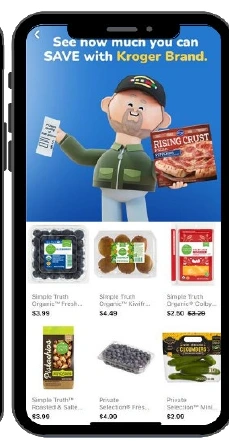
Inside Kroger’s Instant ExperiencePublished campaign
This is the full-screen destination after the tap. Shoppers can browse individual products beneath the campaign cover.
- Platform
- Meta
- Product
- Paid Social
- Category
- Ad formats
What you can give it
- A collection ad shows a cover image or video followed by three product images in Facebook Feed. Tapping it opens the Instant Experience. [1]
- You can build the page from the Storefront, Lookbook or Customer Acquisition templates, or create a custom Instant Experience. [1]
- The cover image or video in the collection ad uses the first media asset from your Instant Experience, so the order of your assets affects the ad itself. [1]
- A custom build lets you choose the components and how they fit a mobile screen. [2]
Use it when
Don’t rely on it when
- Do not rely on Instant Experience to send people straight to a website. This ad destination first opens a full-screen experience within the app. [2]
Set it up
- In Ads Manager, open the ad you are editing and go to Ad format. Select Collection. If it is not shown in Ad setup, click More options, or pick it in Ad creative under Format display options. [2]
- In the Destination section, select Instant Experience. [2]
- Click Create new to build a template, or search for an existing Instant Experience. [2]
- For a custom build, name it, select the components to add and how they fit a mobile screen, then select Save. [2]
- Select Finish. [2]
What it can move
On other platforms
| Platform | Closest feature | Match | How it differs |
|---|---|---|---|
| TikTok | Instant Form | Related | TikTok's Instant Form is an in-app lead capture form where people share contact details and answer questions. Meta's Instant Experience is a full-screen landing page for collection ads that showcases products. They share the in-app, no-external-site idea but serve different goals. [3] |