Spark Ads
Spark Ads is an ad format supported within TikTok's Search Ads Campaign, delivered on the TikTok Search Results Page. The Search Ads Campaign is a TikTok ad campaign that uses keywords to reach people searching for terms related to your product or service, with ads targeted uniquely and exclusively to the TikTok Search Results Page. [1]
See an example
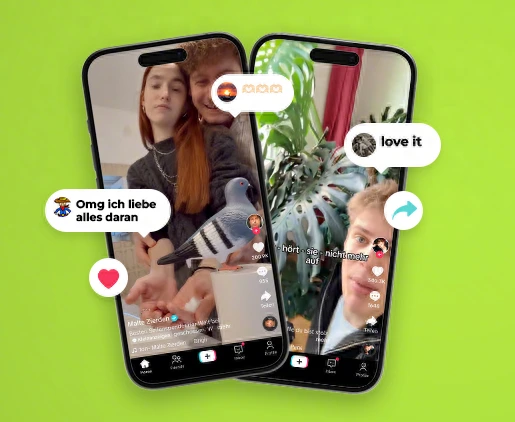
Kleinanzeigen’s creator campaignPublished campaign
TikTok’s campaign illustration shows creator posts used by Kleinanzeigen. The case study explains how the advertiser used Spark Ads to promote selected organic videos in the feed.
The example shows the format in the TikTok feed. This guide focuses on Spark Ads in search.
- Platform
- TikTok
- Product
- Search Ads Campaign
- Category
- Ad formats
What you can give it
- When clicked or tapped, the search ad adopts the regular in-feed video format, appearing within Search stream ads inventory. [1]
- As users scroll the search results page, search ads can autoplay when visible on screen; an autoplayed video counts as both a view and an impression, while a still image ad counts only an impression. [1]
- Autoplayed ads also contribute to video-view metrics (100%, 75%, 50%, 25%), serving as both an impression and a video view. [1]
- Exact ad position (first, second, third, etc.) may vary based on relevancy and feature experimentation. [1]
- Multiple creatives are supported within one ad group (multiple videos or a Carousel Image Ad), but only one video can be displayed (default selected). [1]
- The video format mirrors in-feed video campaigns, so creative from in-feed campaigns can be repurposed for search campaigns; creative selection logic follows the same principles as feed-side logic. [1]
- The interactive add-on for Search Ads Campaign currently supports only display cards and does not support stickers or other interactive add-ons. [1]
Use it when
- Use it when you want to reach people actively searching for terms related to your product or service on the TikTok Search Results Page, using keyword targeting. [1]
- Use it when you want to repurpose existing in-feed video creative for search placements, since the video format mirrors in-feed video campaigns. [1]
Don’t rely on it when
- Do not rely on it when you need guaranteed top ad placement, because exact ad position may vary based on relevancy and feature experimentation. [1]
- Do not rely on it when your campaign depends on stickers or other interactive add-ons, since only display cards are supported for Search Ads Campaign. [1]
Set it up
- Create a Search Campaign using the dedicated campaign creation flow in TikTok Ads Manager. [1]
- Set budgets and target specific keywords for the campaign. [1]
- Upload creative assets for the campaign; you do not need active ads in other campaigns to use the Search Ads Campaign. [1]
- Use the Ad Preview feature in TikTok Ads Manager to check how the ad will appear; it shows only TikTok search result ads. [1]
What it can move
- Video view rate and video-view completion metrics (100%, 75%, 50%, 25%) are meaningful KPIs: because autoplayed search ads count as both an impression and a video view, higher visibility in the search stream should conditionally lift these metrics, with the trade-off that autoplay views may inflate view counts relative to deliberate engagement. [1]
- Impressions are a core delivery metric for both video and still-image search ads, though for still image ads only an impression is counted (no view metrics). [1]
- Keyword-level creative performance is a useful KPI direction: the source recommends testing creatives tailored to specific keywords in each ad group, so comparing engagement by keyword-to-creative pairing can guide optimization. [1]